 Jompter Docs
Keys and system gestures
A keyboard when you need one, and the macOS gestures a trackpad would give you.
The Keys tab of the viewer dock.
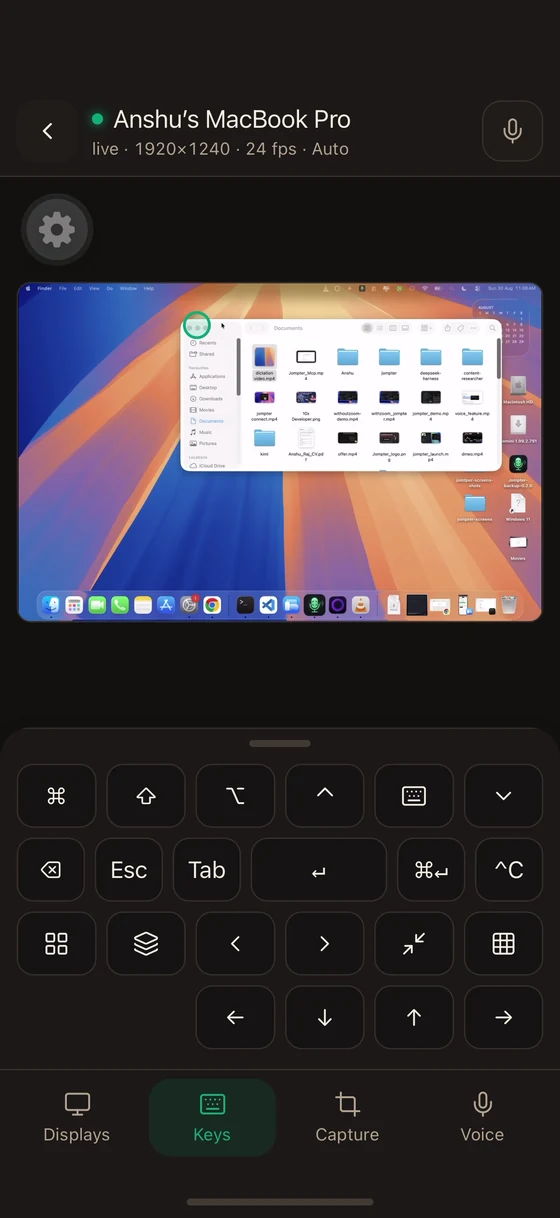
The key panel
A compact keyboard with the keys that are awkward to reach on iOS: a real arrow cluster, Esc, Tab, and shortcuts shaped for working with an AI agent in a terminal.
Modifiers latch the same way they do in the viewer — tap once for the next action, double-tap to lock. The panel says so itself: "Modifiers stick until the next key." See The viewer.
The one shortcut that will not go through
Anything with ⌘Q is refused, whatever else is held with it: ⌘Q quits Jompter, ⌃⌘Q locks the Mac, and ⇧⌘Q logs you out. All three end the session in a way the phone cannot undo — there is no unlock screen you can reach from here — so the Mac declines them rather than stranding you.
Nothing else is filtered. ⌘Space, ⌘⌥Esc and the rest all reach the Mac, because a remote control that quietly swallowed shortcuts would be the more surprising behaviour — and the pointer can reach those menus anyway.
System gestures
The gestures a trackpad would give you, as buttons:
- Mission Control
- App Exposé
- Space left / Space right
- Show Desktop
These send the real macOS gestures, so they behave exactly as they would on the Mac.