 Jompter
A local MCP server that hands your prompt to the agent
Turn on the Jompter MCP, add it to Claude Code, Cursor or Codex, and paste one line. The agent calls get_prompt and reads your words, screenshots and recordings itself — then writes its to-dos where you approve them.
Apple Silicon · macOS Ventura+ · 7-day free trial, no card
What is an MCP server for prompts?
The Jompter MCP server is a local Model Context Protocol server that lets a coding agent fetch your prompt itself instead of waiting for a paste. Switch it on, add it to Claude Code, Cursor or Codex with one line, and the agent calls list_prompts and get_prompt to read your words, screenshots and recordings directly. It writes back through update_task, so its plan arrives as to-dos you approve: proposed, approved, doing, done, or blocked and failed with a note saying what stopped it. The server runs on 127.0.0.1 under the name jompter, is off until you turn it on, and is reached with an access key you can rotate; idle sessions drop after 30 minutes. Prompts never leave your Mac — there is no prompt sync to switch off. Because the agent reads the prompt itself, a screenshot referenced as @screenshot arrives as a file path it can open rather than as a description you had to type out.
Connect once. Hand over one line.
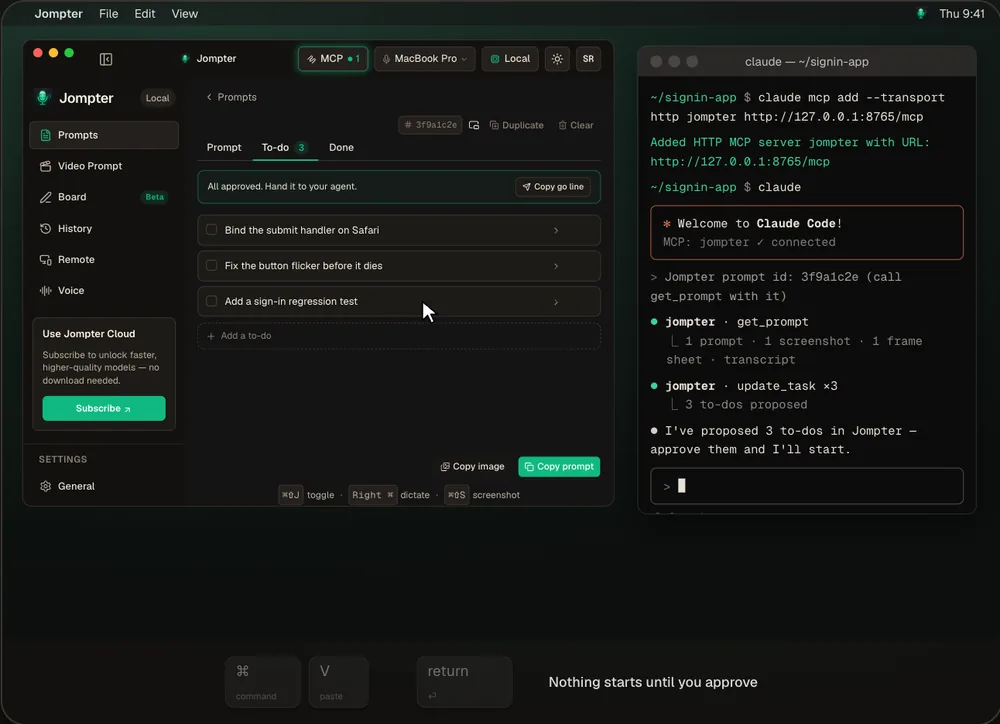
The real Jompter prompt page and MCP panel, with an agent writing to-dos in Claude Code.
Stop pasting context. Let the agent read it.
Everything in one call
get_prompt returns the text, screenshots as files, recordings with frames and transcript, and the to-do list.
You approve the plan
An agent can't start or finish a to-do you haven't approved, or approve one itself.
Local only
The server listens on 127.0.0.1 behind an access key. No traffic leaves your Mac.
Skills included
Install the jompter-prompts and jompter-board skills for Claude Code, Cursor or Codex in one click.
Any agent that speaks MCP.
Snippets are ready for Claude Code, Cursor, Codex CLI, OpenCode and Claude Desktop.
- Server
- One local server named jompter on 127.0.0.1, off by default
- Prompt tools
- list_prompts, get_prompt, update_task
- To-do states
- Proposed → approved → doing → done, or blocked / failed with a note
- Access
- An access key you can rotate; sessions drop after 30 idle minutes
- Privacy
- Prompts never leave your Mac — there is no prompt sync
Copy-paste vs the Jompter MCP
| What | Copy and paste | With Jompter |
|---|---|---|
| Screenshots and frames | Attached one by one | Read by the agent in one call |
| The plan | In the chat scrollback | A to-do list you approve |
| Progress | Scroll and guess | Each to-do ticks doing → done |
| Where it runs | — | A local server on your Mac |
The Jompter MCP, answered.
Turn on the Jompter MCP and add it to your agent. Paste the 'Jompter prompt id' line and the agent calls get_prompt to read the text, screenshots, recordings and to-dos.
Claude Code, Cursor, Codex CLI, OpenCode and Claude Desktop have ready-made snippets. Any MCP client can connect.
No. Everything it writes arrives as Proposed, and Jompter refuses to let it start or finish a to-do you haven't approved.
No. The server is local on 127.0.0.1 and prompts are never synced.
Related features
AI whiteboard
Your agent draws the architecture on a live board while you watch.
How the AI whiteboard works →Voice to prompt
Hold a key and talk. Your words land in Claude Code, Cursor or any app.
How voice to prompt works →Screen recording to prompt
Record the bug while you talk; your agent gets the key frames and transcript.
How screen recording to prompt works →Full detail in the manual: Connect your AI agent (MCP)