 Jompter
What is an AI whiteboard for coding agents?
A Jompter board is a drawing canvas an AI coding agent can draw on through MCP. Ask Claude Code or Cursor to explain an unfamiliar part of the codebase and it lays the architecture out on the board while you watch, then marks what is wrong and sketches the fix. Agents can create boards, add and style shapes and arrows, align and group them, import Mermaid flowcharts and sequence diagrams, and export the result as an image or a scene. The bundled library is roughly 200 components, 32 chart types and about 2,000 icons, compiled into the app so it works with no network. Every board keeps automatic checkpoints alongside states you save yourself, and a deleted board is recoverable for 30 days. The board is in beta. Drawing happens in the app's own canvas rather than a browser tab, and reads are answered from disk, so an agent sketching in the background never pulls a window in front of what you are doing.
Ask. Watch it draw. Point.
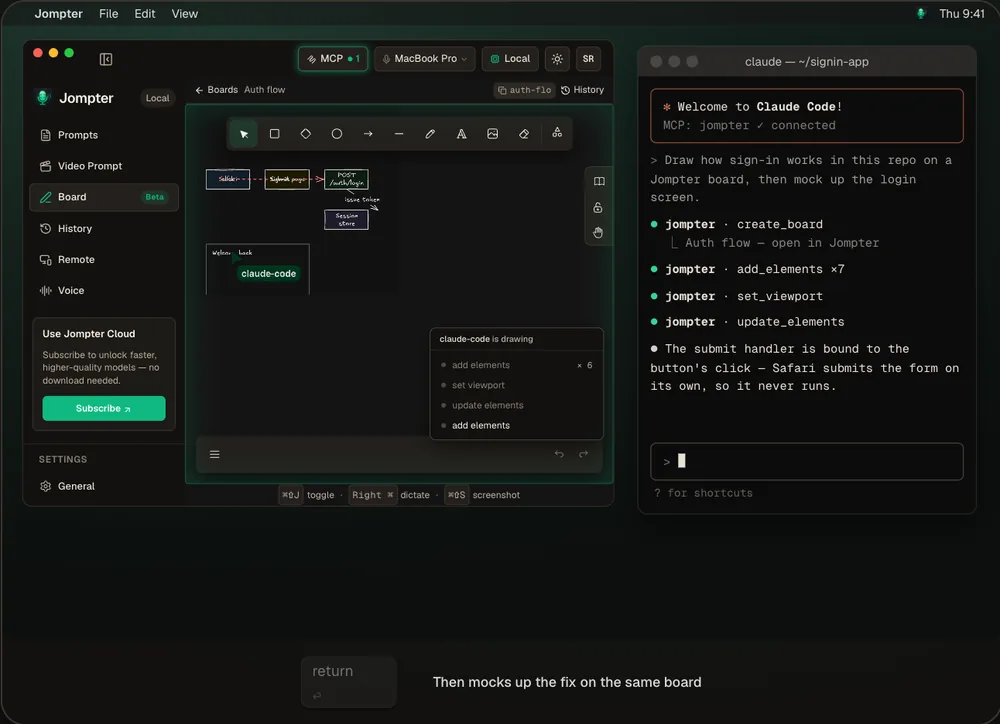
The real Jompter Board, drawn live by an agent over the Board MCP.
Understand code you didn't write.
See the shape of it
A diagram of the flow beats reading ten files to rebuild it in your head.
A real library
About 200 components and 2,000 icons, bundled and offline — wireframes look like wireframes.
Nothing lost
Automatic checkpoints, the state before the agent started, and named saved states you keep.
Export and share
Export PNG or .excalidraw, or share a view-only link to the board.
Any agent on the Jompter MCP.
The same local MCP server your prompts use. Claude Code, Cursor, Codex, OpenCode and Claude Desktop can all draw.
- Agents can
- Create boards, add and style shapes and arrows, align, group, import Mermaid, export
- Mermaid
- Flowcharts and sequence diagrams
- Library
- ~200 components, 32 chart types, ~2,000 icons — offline
- History
- Automatic checkpoints plus saved states; deleted boards kept 30 days
- Status
- Beta
An Excalidraw MCP vs Jompter Board
| What | A standalone Excalidraw MCP | With Jompter |
|---|---|---|
| Setup | Run and wire a separate server | Built into Jompter's MCP |
| Library | Bring your own | ~200 components and ~2,000 icons bundled |
| Undo an agent | Manual | Checkpoints and saved states |
| Your prompts | Separate tool | Same agent, same server |
The AI whiteboard, answered.
Yes — through the Jompter Board MCP. Ask for a diagram and it draws shapes, arrows and labels on a live board you can edit.
Architecture diagrams, flows, sequence diagrams and wireframes. Mermaid flowcharts and sequence diagrams import directly.
Yes. Jompter keeps automatic checkpoints and always keeps the state from just before an agent started drawing.
Yes — as PNG, as an .excalidraw file, or as a view-only link if board sync is on.
Related features
MCP prompts & to-dos
Your agent reads the whole prompt itself and keeps a to-do list you approve.
How the Jompter MCP works →Voice to prompt
Hold a key and talk. Your words land in Claude Code, Cursor or any app.
How voice to prompt works →Read aloud
Select what your agent wrote and hear it explained, on your Mac.
How read aloud works →Full detail in the manual: Board and AI agents