 Jompter
Offline speech to text on your Mac, with open models
Download a speech model once and Jompter transcribes on your Mac — Whisper, Parakeet or Nemotron — with no per-token bill. With a licence and Local mode, it works with the network cable out.
Apple Silicon · macOS Ventura+ · 7-day free trial, no card
What is offline speech to text on a Mac?
Offline speech to text means the audio never leaves the machine. Jompter downloads an open speech model once — Whisper, Parakeet or Nemotron, between 100 MB and 3 GB depending which — and transcribes locally, with no API key and no per-token bill. With a licence and Local mode switched on it keeps working with the network cable out; the free trial transcribes in the cloud. The language side can be local too: a bundled on-device model, or your own through Ollama, LM Studio or a custom server. Speech synthesis runs on the Mac as well, so dictation, transforms and reading text back can all happen with no account and no meter. It needs Apple Silicon, an M1 or newer, and macOS 13 or later; there is no Intel build. Each model is downloaded once from the in-app catalogue and then belongs to the machine, so the second transcription costs nothing and works on a plane.
Download once. Run it locally.
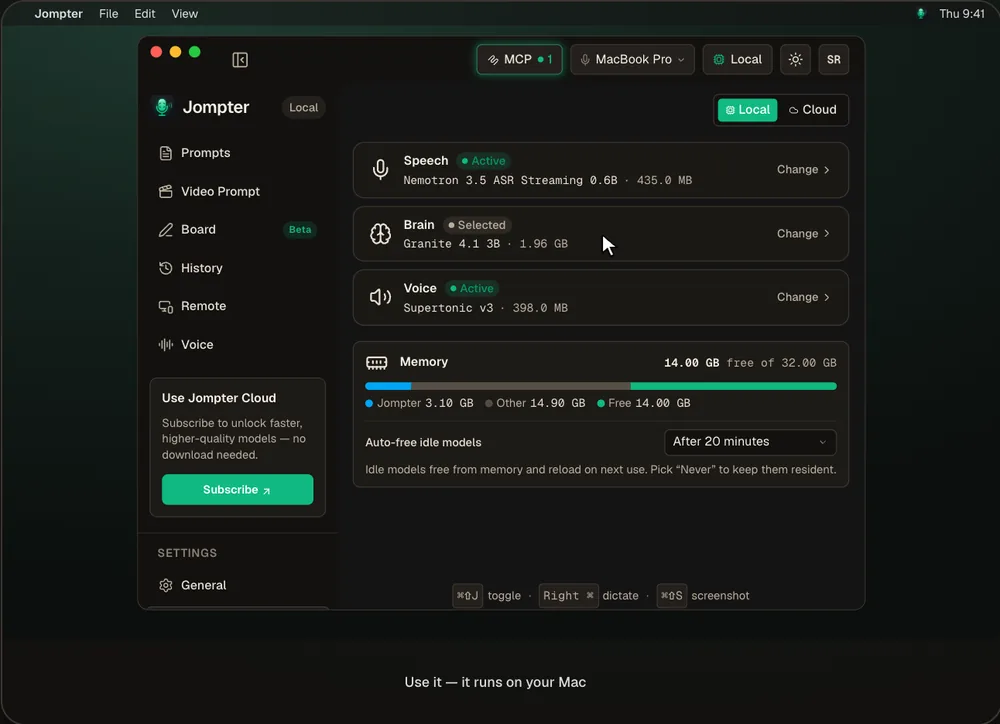
The real Jompter Model Library: downloading a model, then switching between Local and Cloud.
Your voice, your Mac, your models.
Audio stays on your Mac
In Local mode your voice is transcribed on-device and never uploaded.
No per-token bill
Open models run on your hardware, so there's no meter running.
Live words
Nemotron and Parakeet stream words as you talk; Whisper is the accurate all-rounder.
Bring your own
Use Ollama, LM Studio or any OpenAI-compatible server for the language model.
Local models, every app.
Transcribed text types into any app — Claude Code, Cursor, your editor, a chat.
- Speech
- Whisper, Parakeet and Nemotron
- Brain
- A bundled on-device model, Ollama, LM Studio or a custom server
- Voice
- On-device text to speech
- Offline
- With a licence in Local mode — the trial runs in the cloud
- Needs
- Apple Silicon (M1 or newer), macOS 13 or later; 100 MB–3 GB per model
Cloud dictation vs local
| What | Cloud dictation | With Jompter |
|---|---|---|
| Where audio goes | A server | Stays on your Mac |
| Cost | A subscription or usage | Covered by a licence |
| Without internet | Stops | Keeps working in Local mode |
| Choice of model | Theirs | Whisper, Parakeet, Nemotron, or your own |
Comparing apps? Open-source dictation apps compared
Offline speech to text, answered.
Yes, with a licence. In Local mode, with Remote and board sync off, it works with the network cable out. The free trial runs in the cloud.
Whisper (tiny to large v3 and turbo), Parakeet and Nemotron. Nemotron and Parakeet stream words while you talk.
Yes, for the language model that powers transforms and Explain — or any OpenAI-compatible server.
Apple Silicon (M1 or newer) with macOS 13 Ventura or later. Intel Macs aren't supported.
Related features
Voice to prompt
Hold a key and talk. Your words land in Claude Code, Cursor or any app.
How voice to prompt works →Read aloud
Select what your agent wrote and hear it explained, on your Mac.
How read aloud works →Control your Mac from iPhone
Check a long run, answer the agent and dictate the next prompt from your phone.
How Jompter Remote works →Full detail in the manual: AI models