 Jompter
A Handy alternative for when your words go to a coding agent.
Handy is free, open-source dictation that runs on your own machine — a genuinely good tool. Jompter starts where it stops: your voice, the screenshot you took mid-sentence and the screen recording of the bug become one prompt that Claude Code or Cursor reads for itself.
Free for 7 days · up to 10,000 words · no card · Apple Silicon, macOS Ventura+
Dictation gives you words. Coding agents need context.
Prompts, not just text.
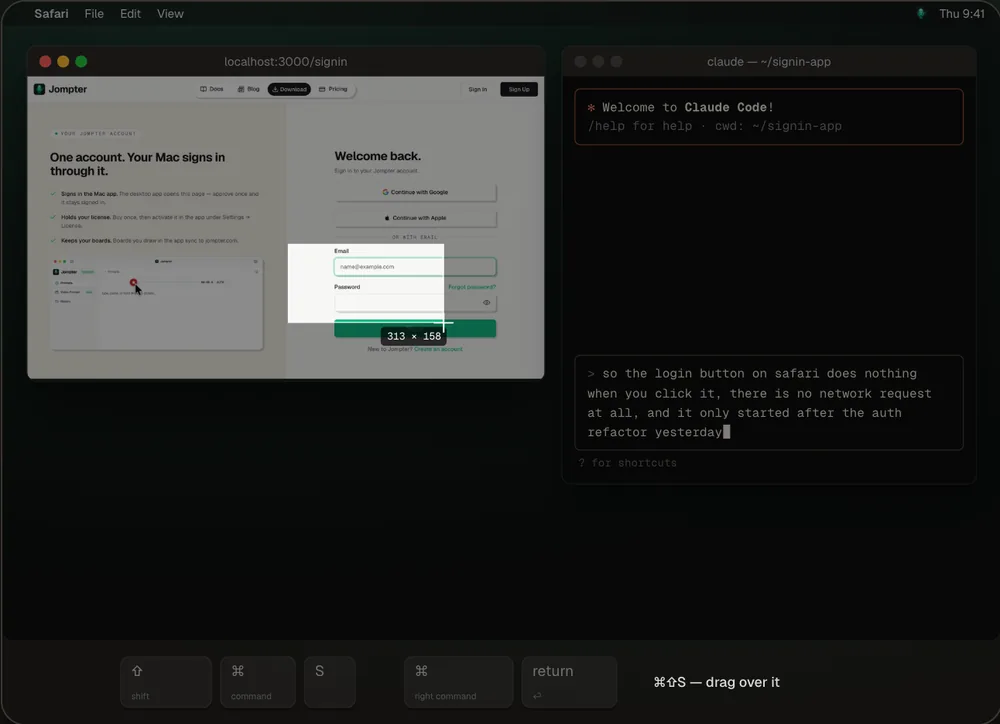
Your words land in the prompt with the screenshot you took mid-sentence and the screen recording of the bug — one Markdown prompt your coding agent reads for itself.
Your agent reads it directly.
Jompter's MCP server hands prompts, screenshots and to-dos to Claude Code, Cursor, Codex and OpenCode — no copy and paste.
It sees what you see.
Box, point at or blur part of a screenshot before it's sent, or record the flicker and let Jompter keep the key frames with your transcript.
Context that persists.
Plans keep the error, the screenshots and what you tried, so the follow-up is one line added — not the whole story re-explained.
Comparing open-source options? See every open-source dictation app side by side →
Speak the bug. Snap the screen. Paste one prompt.
Your words, the annotated screenshot and the key frames from a recording land in one Markdown prompt, ready for Claude Code, Cursor or ChatGPT.
- Voice, on-device. Whisper, Parakeet and Nemotron transcribe on Apple Silicon — no audio leaves your Mac.
- Screens, redacted. Annotate with pen, arrow, box, text or blur before anything is shared.
- Copied in one click. Markdown and images together, straight into your agent.
Jompter vs Handy
Both tools are good at what they're built for. The question is what you're building prompts for.
Based on each product's public positioning, checked September 2026. Spot something out of date? Tell us and we'll fix it.
Which one should you pick?
Different jobs, different tools. Here's the fair split.
Pick Jompter if…
- Your dictation ends up in Claude Code, Cursor or Codex anyway
- You want the screenshot and the screen recording in the same prompt as your words
- You want your agent to pull prompts and to-dos over MCP instead of you pasting
Pick Handy if…
- You want a free, open-source tool you can read, audit or modify
- You're on Windows or Linux
- Speech to text in any text field is all you need
Own it. No subscription to run locally.
Every plan starts with the same 7-day trial. Cloud is optional and separate.
Free trial
7 daysEverything unlocked · up to 10,000 words
License
Best valueor — / year · on-device, offline
Cloud
OptionalHeavy — / month · cloud transcription + AI transforms
Switching from Handy?
The questions developers ask before trying Jompter.
For plain speech to text, Handy is excellent, free and open source, and it runs on Windows and Linux too. Jompter is for the step after: turning what you said, plus screenshots and recordings, into a prompt your coding agent can act on.
No. Jompter is a closed-source Mac app. If an open-source license matters to you, Handy, OpenWhispr and VoiceInk are all good picks — our open-source roundup compares them.
Yes. They don't conflict — set them to different hotkeys, and keep Handy for everyday dictation and Jompter for coding sessions.
Yes — 7 days, up to 10,000 transcribed words, no card required.