 Jompter
How do you turn a screen recording into a prompt?
Screen recording to prompt turns a video of a bug into something a text model can read. Jompter records a region you choose — with pause, a timer and drawing tools — while you narrate what is going wrong. It then drops near-duplicate frames and keeps a handful of timestamped key frames, sampling at 1 fps on Standard, 2 fps on Detailed or 4 fps on Maximum. The output is your transcript interleaved with [00:04]-style frame lines, which you hand over as one combined sheet or as the video itself. Footage you already have works the same way: .mp4, .mov, .mkv, .webm and .m4v files can be dropped onto any Jompter window. The feature is in beta and needs Screen Recording and Microphone permission. The point of the frame sampling is cost and comprehension at once: a minute of screen capture becomes a few images an agent reads in order rather than a file it cannot open.
Record it once. Send the repro.
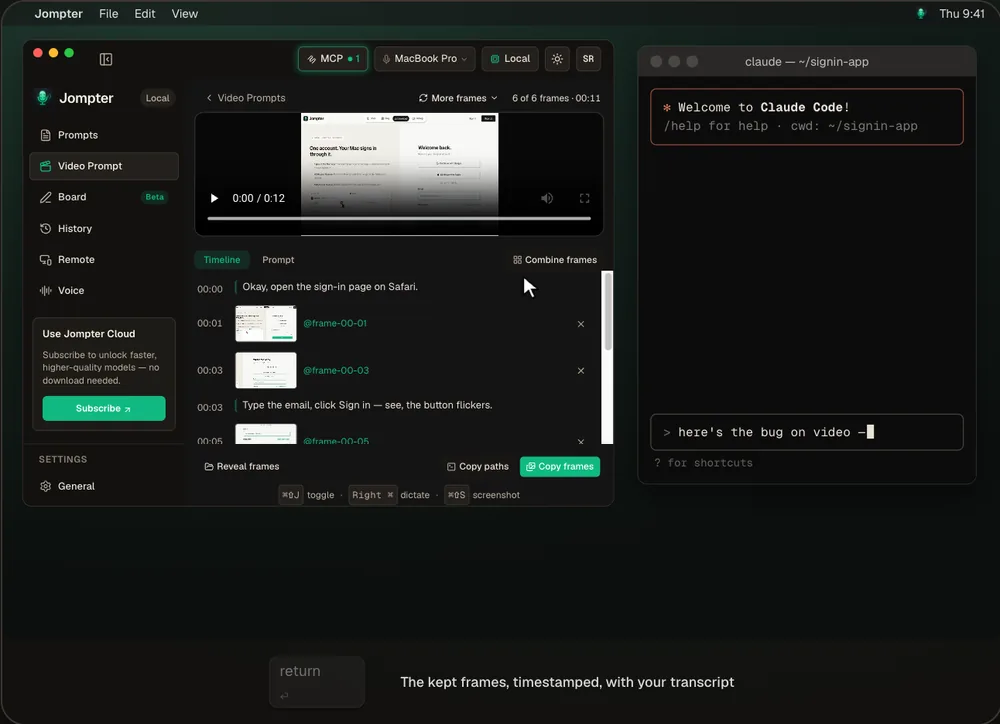
The real Jompter Video Prompt page: recording a region, then combining the key frames into one sheet.
Some bugs only show up moving.
Flickers and races
A state that lasts half a second never makes it into a screenshot. A recording catches it.
Frames, not a heavy video
Your agent gets a few timestamped frames and the transcript instead of a file it can't watch.
Your narration comes with it
What you said while recording is transcribed and sent alongside the frames.
You set the detail
1, 2 or 4 frames per second, and keep 8, 12, 20 or 40 frames.
Hand the repro to any agent.
Drag the combined sheet or the video into Claude Code, Cursor or any chat, or copy the prompt with timestamped frame references.
- Record
- A region you choose, with pause, a timer and drawing tools
- Import
- .mp4, .mov, .mkv, .webm and .m4v — drop them on any Jompter window
- Frames
- Standard 1 fps, Detailed 2 fps, Maximum 4 fps; near-duplicates removed
- Output
- A transcript plus [00:04]-style frame lines, a combined sheet, or the video
- Status
- Beta. Needs Screen Recording and Microphone permission
Sending a video vs a Video Prompt
| What | A raw screen recording | With Jompter |
|---|---|---|
| What the agent can read | Often nothing — most agents can't watch video | Timestamped frames and a transcript |
| Size | A large file | A few frames, or one combined sheet |
| Your explanation | In your head | Transcribed with the frames |
| Pointing things out | Hard to do | Draw on screen while recording |
Screen recordings for AI agents, answered.
Not directly as video. Jompter turns the recording into timestamped key frames plus your transcript, which Claude Code and Cursor read as images and text.
Up to 12 by default after removing near-duplicates. You can choose 8, 12, 20 or 40, at 1, 2 or 4 frames per second.
Yes — drop an .mp4, .mov, .mkv, .webm or .m4v on Jompter and it is transcribed and split into frames straight away.
It's in beta. It works today, and it's still changing.
Related features
Screenshot to prompt
Snap it, mark it up, blur what's private, drag it into the prompt.
How screenshot to prompt works →Voice to prompt
Hold a key and talk. Your words land in Claude Code, Cursor or any app.
How voice to prompt works →MCP prompts & to-dos
Your agent reads the whole prompt itself and keeps a to-do list you approve.
How the Jompter MCP works →Full detail in the manual: Video Prompt