 Jompter
What is voice to prompt?
Voice to prompt is dictation aimed at an AI coding agent rather than at a document. In Jompter you hold Right ⌘ — rebindable, with a tap of Right ⌥ for hands-free or a three-finger trackpad click — describe the bug the way you would to a colleague, and let go. The words are typed into whatever has focus: the Claude Code terminal, Cursor, a browser field. They are kept in the prompt you are building too, so a screenshot or a recording can join the same explanation before you send it. Transcription runs on your Mac with a licence: Nemotron and Parakeet stream partial words while you speak, Whisper transcribes when you stop. Cloud transcription is optional and falls back to the local model. It needs Microphone and Accessibility permission, Apple Silicon and macOS 13 or later.
Talk, let go, send.
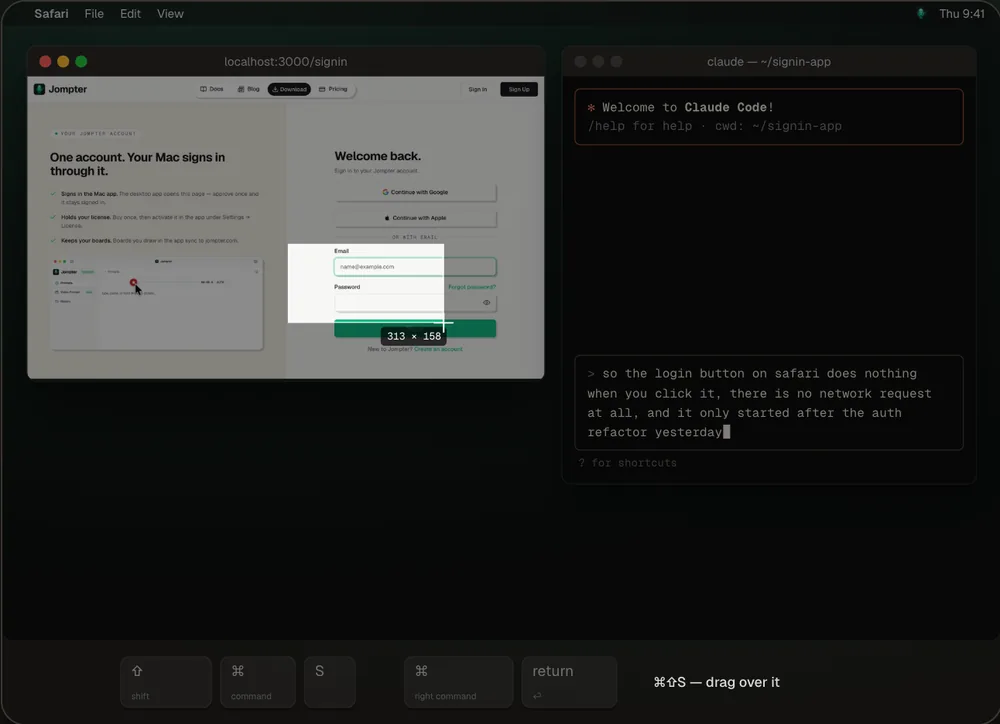
The real Jompter dictation pill typing into Claude Code while you talk.
Explaining beats typing.
You say more than you type
Spoken prompts carry the context — what you tried, what you expected — that a typed one-liner leaves out.
Clean it up after
Polish fixes grammar and tone, Prompt Engineer reshapes it for Claude or Cursor, Summarize makes three bullets. Off until you want it.
Hands-free when you need it
Tap Right ⌥ to start and again to stop, or dictate with a three-finger trackpad click.
Every take is kept
History keeps each recording on your Mac — replay it, or re-transcribe it with a better model.
Types into whatever has focus.
Jompter types at the cursor in any app, so it works with every coding agent and editor — and with Slack, email and docs too.
- Start
- Hold Right ⌘ (rebindable), tap Right ⌥ for hands-free, or three-finger click
- Live words
- Nemotron and Parakeet stream as you speak; Whisper transcribes when you stop
- Languages
- Auto-detect or pick one, with Translate to another language
- Where it runs
- On your Mac with a licence; cloud transcription is optional and falls back to local
- Needs
- Microphone and Accessibility permission; Apple Silicon, macOS 13 or later
Typing a prompt vs saying it
| What | Typing | With Jompter |
|---|---|---|
| Detail you include | What you have patience to type | Everything you'd say out loud |
| Screenshots | Pasted separately | Dropped in mid-sentence with ⌘⇧S |
| Tidying up | By hand | Polish or Prompt Engineer, if you want it |
| Where it goes | The window you typed in | Typed in, copied, and kept in your prompt |
Comparing apps? Jompter vs Wispr Flow
Voice to prompt, answered.
Yes. Hold Right ⌘ in the Claude Code terminal and talk; the words are typed into its prompt when you let go. It works the same in Cursor, Codex or any app with a text field.
Claude Code has a /voice mode. Jompter works across every app instead, adds screenshots and recordings to the same prompt, keeps every take in History, and can run transcription on your Mac.
With Nemotron or Parakeet, yes — partial words stream in as you speak. Whisper models transcribe when you stop.
Yes. Tap Right ⌥ to start and again to stop. A forgotten hands-free session finishes itself after 30 minutes and delivers the text.
With a licence, transcription runs on open models on your Mac and your audio stays there. Cloud transcription is opt-in.
Related features
Screenshot to prompt
Snap it, mark it up, blur what's private, drag it into the prompt.
How screenshot to prompt works →Offline speech to text
Whisper, Parakeet and Nemotron on your Mac — no per-token bill.
How offline speech to text works →MCP prompts & to-dos
Your agent reads the whole prompt itself and keeps a to-do list you approve.
How the Jompter MCP works →Full detail in the manual: Dictation