 Jompter
A MacWhisper alternative that writes prompts, not transcripts.
Jompter is a MacWhisper alternative built for the moment your words go to a coding agent: the screenshot, the screen recording and your voice become one prompt, handed to Claude Code, Cursor or Codex. MacWhisper is a polished Mac transcriber for audio files, meetings with speaker names and system-wide dictation, all on-device.
Free on your Mac · no card · Apple Silicon, macOS Ventura+
Quick answer
Pick MacWhisper if you transcribe audio files, interviews or meetings and want speaker names. Pick Jompter if your words go to a coding agent: it combines live dictation with screenshots and screen recordings in one prompt for Claude Code, Cursor or Codex.
What MacWhisper does well
MacWhisper is a polished Mac transcriber. It handles audio and video files, records meetings in Zoom, Teams and more, tells speakers apart, and offers system wide dictation, all on your Mac. Pro is a one time purchase.
Where Jompter is different
Jompter is built for a different moment: explaining a bug to an agent. Your live dictation, a marked up screenshot and the key frames of a recording go into one prompt, and Claude Code or Cursor reads it over MCP. It isn't a meeting or file transcriber.
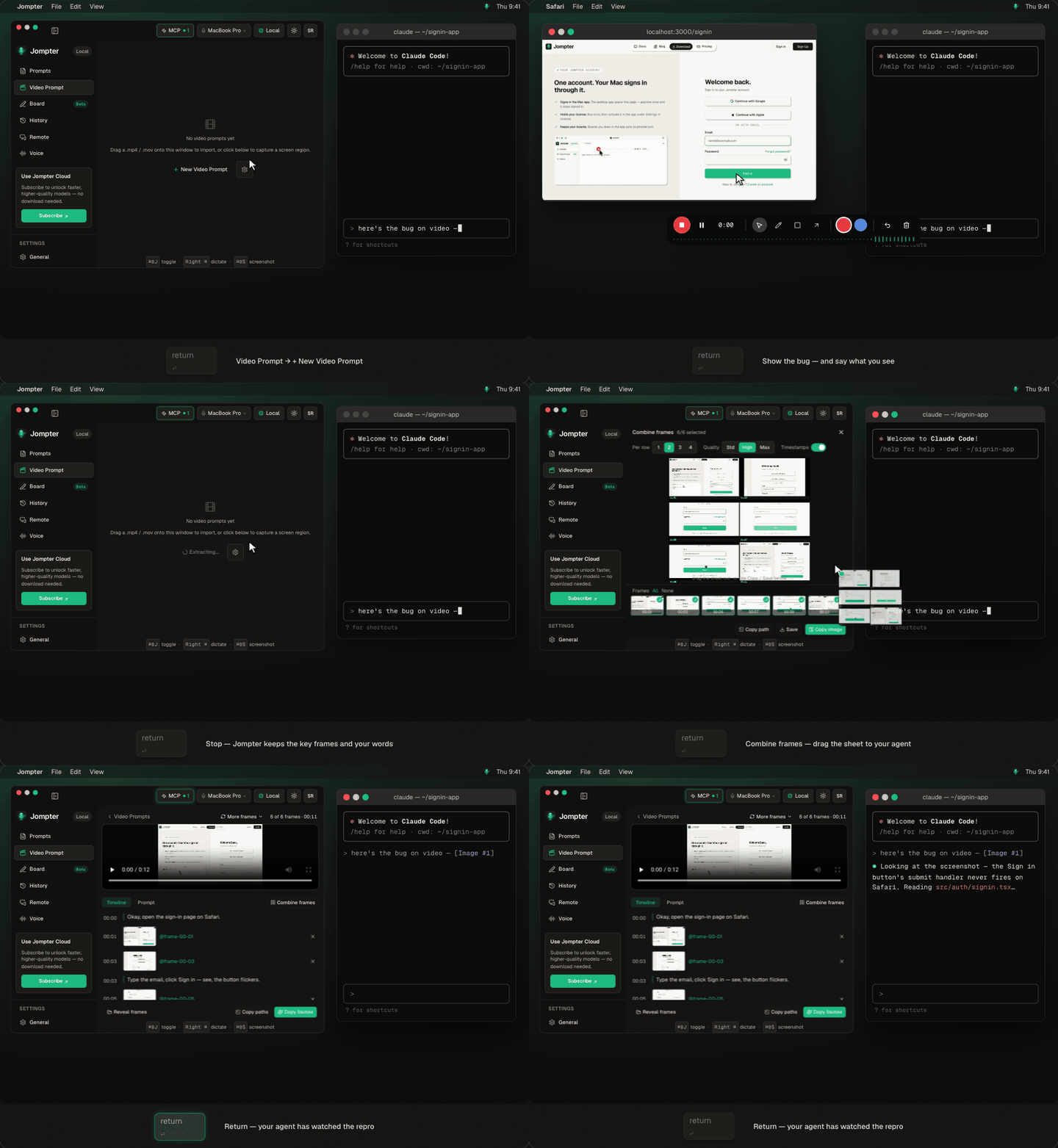
Same task, both apps
Tell Claude Code about a button that jumps when the page loads.
With MacWhisper
- 1Take a screenshot with Shift+Command+4.
- 2Dictate the description into Claude Code with MacWhisper.
- 3Switch back, paste the screenshot with Ctrl+V, and point at it in words.
- 4For a bug that moves, record the screen separately and describe what happened, because the agent can't watch the video.
With Jompter
- 1Hold Right ⌘ and describe the bug.
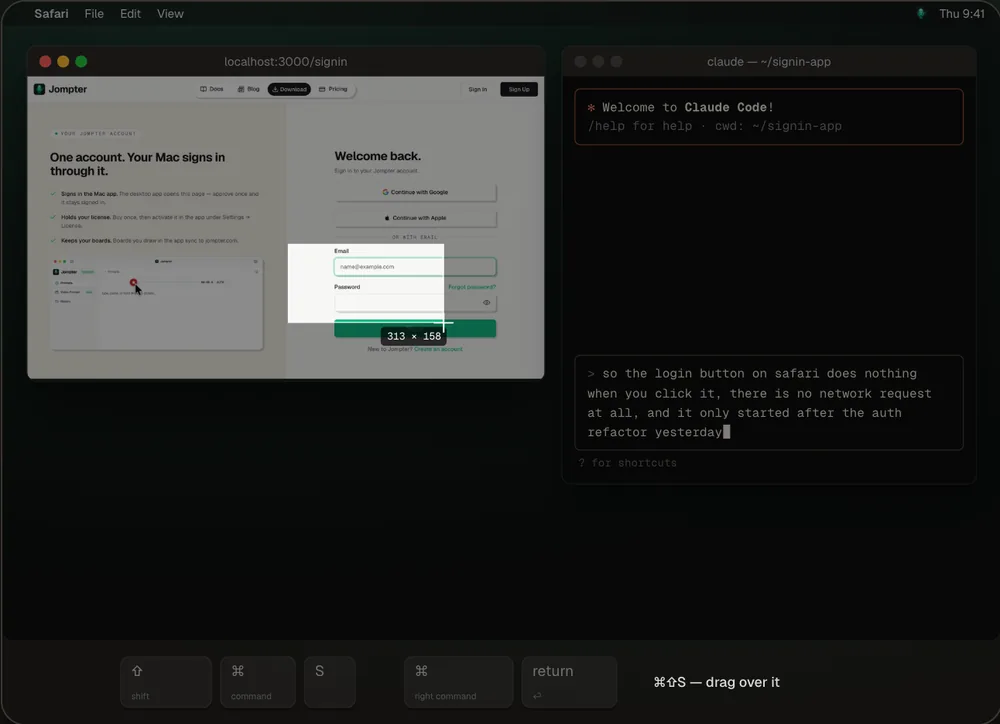
- 2Press ⌘⇧S mid sentence and box the button. The screenshot lands between your words.
- 3For a bug that moves, record it with Video Prompt. The key frames and your narration join the same prompt.
- 4Paste one line into Claude Code, and it reads the whole prompt over MCP.
How to switch from MacWhisper
- Download Jompter and sign in with a free account.
- Pick Local in setup and download a speech model once: Whisper, Parakeet or Nemotron.
- Hold Right ⌘ to dictate, or rebind it in Settings. Keep MacWhisper on its own hotkey if you still want it for other apps.
- Turn on MCP and connect Claude Code, Cursor or Codex, so your agent reads prompts itself.
Dictation gives you words. Coding agents need context.
Prompts, not just text.
Dictation tools stop at words. Jompter bundles your voice, screenshots, annotations, and screen recordings into one AI-ready Markdown prompt for Claude Code, Cursor, or ChatGPT.
Free on your Mac.
Dictation, prompts and the MCP hand-off are free and unlimited on your Mac, with no meter and no card. Screenshots, recordings, boards and Remote are free within limits, and a one-time license removes them, no subscription required.
Context that persists.
Plans keep the running context of a debugging session (the error, the screenshots, what you tried), so a follow-up is one line added, not everything explained again.
Speak the bug. Snap the screen. Paste one prompt.
Your words, the annotated screenshot and the key frames from a recording land in one Markdown prompt, ready for Claude Code, Cursor or ChatGPT.
- Voice, on-device. Whisper, Parakeet and Nemotron transcribe on Apple Silicon, no audio leaves your Mac.
- Screens, redacted. Annotate with pen, arrow, box, text or blur before anything is shared.
- Copied in one click. Markdown and images together, straight into your agent.
Jompter vs MacWhisper
Both tools are good at what they're built for. The question is what you're building prompts for.
Based on each product's public positioning, checked September 2026. Spot something out of date? Tell us and we'll fix it.
Which one should you pick?
Different jobs, different tools. Here's the fair split.
Pick Jompter if…
- Your dictation mostly goes to Claude Code, Cursor or Codex
- You want screenshots and screen recordings in the same prompt as your words
- You want your agent to read the prompt and its to-dos over MCP
Pick MacWhisper if…
- You transcribe interviews, lectures or meetings and need speaker names
- You want to batch-transcribe audio and video files
- You want to bring your own AI provider keys for cleanup prompts
Free on your Mac. $99 once to lift the limits.
Dictation on local models is free and unlimited. Cloud is optional and separate.
Dictation
ForeverLocal models · no word cap
License
Best valueor — / year · on-device, offline
Cloud
OptionalHeavy — / month · cloud transcription + AI transforms
Switching from MacWhisper?
The questions developers ask before trying Jompter.
MacWhisper has a free tier, and its Pro version is a one-time license. Jompter's dictation, prompts and MCP hand-off are free and unlimited on your Mac, with free limits on screenshots, recordings, boards and Remote.
What comes out. MacWhisper is built around transcripts: files, meetings and dictation into any app. Jompter builds a prompt for a coding agent: your words plus annotated screenshots and recording frames, kept in a Plan and handed over MCP.
Yes, they don't conflict. Many people keep MacWhisper for meetings and files and use Jompter for AI coding sessions. Give each a different hotkey.
Download Jompter and sign in with a free account, pick Local and download a speech model once, then hold Right ⌘ to dictate. You can keep MacWhisper on its own hotkey for other apps. Turn on MCP to connect Claude Code, Cursor or Codex.
Yes, on your Mac. Dictation, prompts, the MCP hand-off, transforms, translation and Speak are free and unlimited. The heavier features are free within limits — 20 screenshots a day, 5 screen recordings, 3 boards and one 10-minute Remote session a day — and a $99 one-time license removes every limit.
Other tools developers switch from.
Jompter vs Wispr Flow
A Wispr Flow alternative built for AI coding. Free on your Mac.
Read the comparisonJompter vs superwhisper
A superwhisper alternative that builds the whole prompt.
Read the comparisonHow Jompter works
Install, pick a speech model and build your first prompt in the docs.
Open the docs