 Jompter
Control your Mac from your iPhone — and keep your agent moving
Pair Jompter Remote with your Mac, approve the session, and drive it from your phone: check a long agent run, answer its question, dictate the next prompt. The picture goes straight from your Mac to your phone.
Apple Silicon · macOS Ventura+ · 7-day free trial, no card
How do I control my Mac from my iPhone?
Jompter Remote is an iPhone app that shows your Mac's screen and lets you drive it, so a long agent run does not pin you to the desk. Pair the two with a single-use QR code or a six-digit code you approve on the Mac, and the picture streams peer-to-peer over WebRTC at Auto, 1080p, 720p or 540p. From the phone you get a trackpad-style pointer, keys and gestures, a snip tool and push-to-talk dictation — enough to read an agent's question, answer it and dictate what it should do next. The app is an open TestFlight beta. It needs a lifetime licence or a cloud plan rather than the trial, and Remote switched on in the Mac app. Because the stream is peer-to-peer, the picture goes from your Mac to your phone rather than through a server, and the session ends when you dismiss it on either device.
Pair once. Drive it from anywhere.
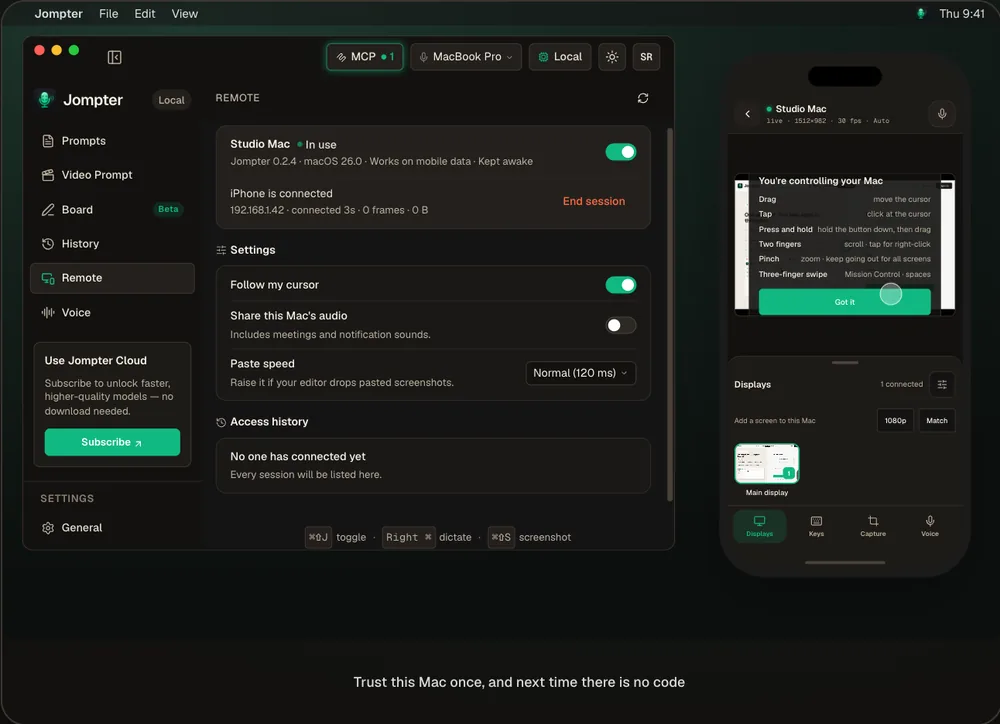
The real Jompter Remote iPhone app pairing with a Mac and streaming its screen.
Your agent doesn't stop when you leave the desk.
Check a long run
See where the agent is, from the kitchen or the couch.
Answer it
When it's blocked on a question, answer and keep it going.
Dictate from your phone
Push to talk — your Mac transcribes it with its own models, and nothing is typed until you tap Paste.
You approve every session
A code only you can see, and the picture goes peer-to-peer — our servers never see it.
Keep any agent moving.
Remote drives the whole Mac, so it works with whatever your agent runs in — a terminal, Cursor, a browser.
- App
- Jompter Remote for iPhone, open beta on TestFlight
- Pairing
- A single-use QR code or a 6-digit code you approve on the Mac
- Picture
- Peer-to-peer WebRTC; Auto, 1080p, 720p or 540p
- Controls
- Trackpad-style pointer, keys and gestures, snip, push-to-talk
- Needs
- A lifetime licence or cloud plan (not the trial); Remote switched on on the Mac
Remote desktop apps vs Jompter Remote
| What | A generic remote desktop app | With Jompter |
|---|---|---|
| Dictate a prompt | Type on a phone keyboard | Push to talk, transcribed by your Mac |
| Snip into the prompt | — | Snip a region; it pastes at the Mac's cursor |
| Approving access | Varies | A code you approve on the Mac, every session |
| The picture | Often relayed | Peer-to-peer from your Mac |
Jompter Remote, answered.
Yes, with Jompter Remote. Pair it, approve the session on the Mac, and use your phone as a trackpad, keyboard and microphone.
Yes. Remote shows your Mac's screen, so you can watch a long run, answer the agent and dictate the next prompt.
No. The picture goes peer-to-peer from your Mac to your phone; our servers only help the two find each other.
Not yet — it's an open beta on TestFlight, for iPhone. It needs a lifetime licence or a cloud plan.
Related features
Voice to prompt
Hold a key and talk. Your words land in Claude Code, Cursor or any app.
How voice to prompt works →MCP prompts & to-dos
Your agent reads the whole prompt itself and keeps a to-do list you approve.
How the Jompter MCP works →Offline speech to text
Whisper, Parakeet and Nemotron on your Mac — no per-token bill.
How offline speech to text works →Full detail in the manual: Jompter Remote